Docs/Getting Started
What is LeadPinger?
LeadPinger finds the people already asking for what you sell, on Reddit, LinkedIn and X, and hands you each one with the evidence and a drafted reply. This page explains the whole product in five minutes.
Most outreach starts with a list of strangers and a numbers game. LeadPinger starts from the other end: somewhere on Reddit, LinkedIn or X, someone is describing the exact problem you solve, asking for recommendations, or complaining about the tool they want to leave. Those conversations are happening right now, and they are the warmest leads you will ever get. LeadPinger's job is to catch them for you.
How it works
You create an agent and tell it two things: what you offer, and who you are looking for. From the moment you launch it, the agent hunts around the clock. You do not run searches, refresh feeds, or check back on a schedule. When your agent finds someone worth talking to, that person appears in your Leads queue, and you can reach out while the moment is still warm.
Agents find people in two different ways:
- What people say. Your agent listens for the topic phrases you gave it across Reddit, LinkedIn posts and X, then reads every match and keeps only the ones showing real buying signal: someone seeking a solution, comparing options, venting about a competitor, or asking for recommendations.
- Who people are. With LinkedIn Sales Navigator connected, your agent also finds the exact people who match your ideal customer profile: the right job titles, at the right companies, in the right places, and brings them in as leads automatically. See Connecting LinkedIn.
Every lead carries its evidence
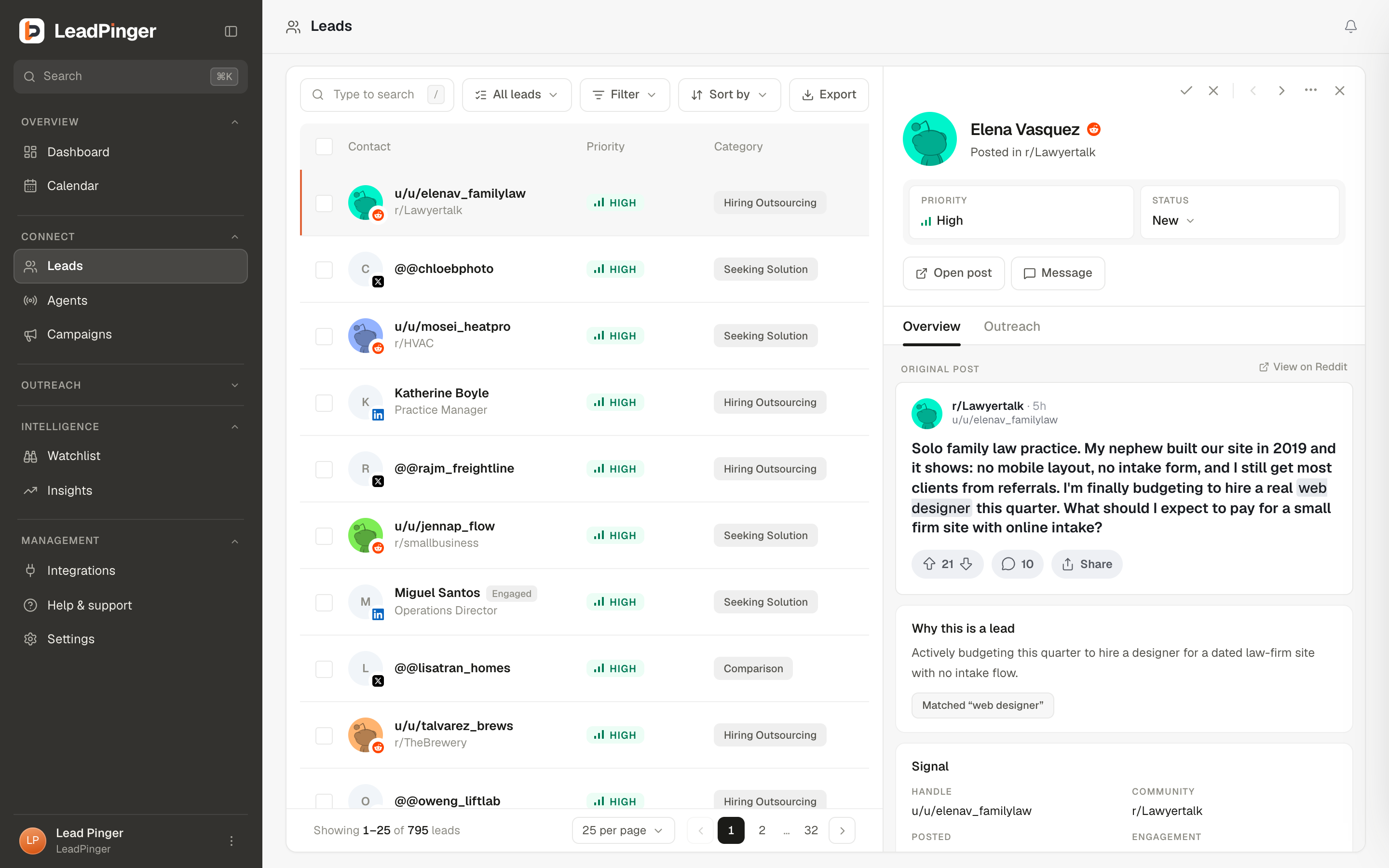
LeadPinger never asks you to trust a number. Each lead arrives with a priority, High, Medium or Low, and the reason it earned it: the exact post or comment that triggered it, quoted in full, or the profile facts that matched your ideal customer. You always see why someone is in your queue before you decide to reach out. The Lead Priorities guide explains what each level means and what to do at each one.
From found to conversation
For every lead, LeadPinger drafts the outreach for you: a comment, a DM, or a LinkedIn connection note, written in the voice of the campaign the lead belongs to. The campaign's mode decides what happens next: you post it yourself, approve it in one click, or let Autopilot send it for you. Replies land in Engage, a single inbox for every conversation your agents started, across every channel.
Three words you will see everywhere
- Scanned is everything your agents read.
- Matches are the posts worth a look.
- Leads are the people worth talking to.
The funnel narrows sharply on purpose. Thousands of posts scanned can produce a handful of leads, because a lead in LeadPinger means a person showing real intent or a real fit, not a keyword match.
Where everything lives
- Dashboard: your numbers at a glance, the latest top leads, replies, and signals.
- Leads: every person your agents found, with priorities, filters, and outreach.
- Agents: create, tune, pause and duplicate your hunters.
- Engage: the inbox for every conversation, with AI drafts waiting for your approval.
- Watchlist: hiring, funding and job-change events on the accounts you care about.
- Insights: how your agents are doing, and exactly what to change.
- Integrations: Slack alerts, CRM sync, spreadsheets and webhooks.
What LeadPinger is not
LeadPinger is not a spam cannon. Sending always runs through accounts you connect and control, on a warm-up ladder that starts at a few comments and DMs a week and only rises after clean weeks, and an account moves back a stage and pauses the moment its outreach is received badly. There is a do-not-contact suppression list that is enforced on every send, and an emergency stop that halts every account at once. The goal is a handful of honest conversations with people who already want to talk, not volume.
Questions this page didn't answer? Email support@leadpinger.ai, we usually reply within one business day.