Docs/Automation & Integrations
Outreach Automation & Workflows
A visual LinkedIn sequence that runs when your agent finds a lead: connect, wait, message, branch on the reply. It sends within the account's warm-up ladder, like everything else.
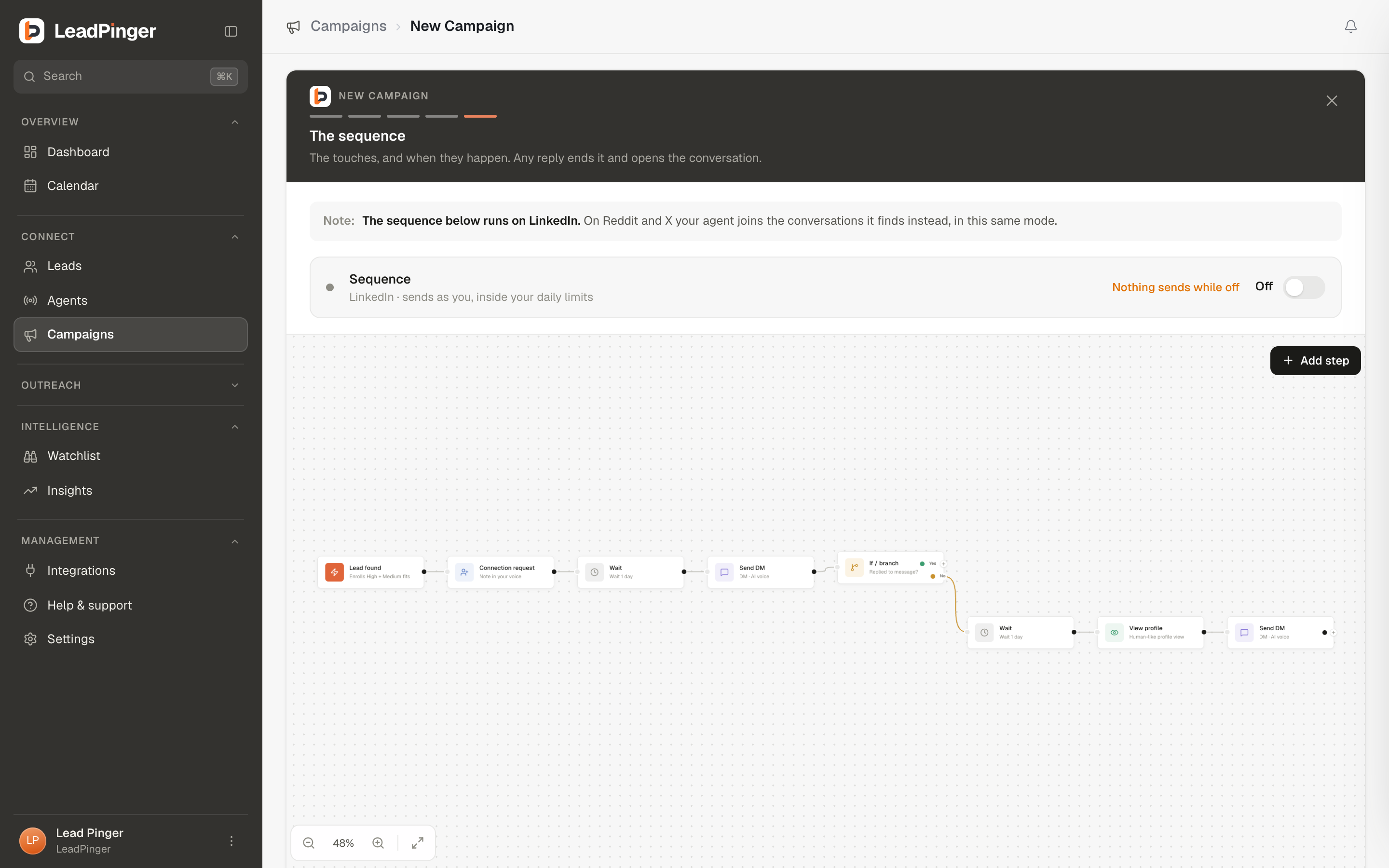
Every campaign has a LinkedIn sequencestep: a canvas of connected steps that runs, on LinkedIn, for each qualifying lead the agents linked to that campaign find. A standard sequence is already built when you create a campaign; how much of the conversation runs on its own is the campaign's mode, chosen on the Goal & mode step.
The default sequence
Lead found → connection request with a note in the campaign's voice → wait a day → DM → did they reply? If not: wait a day, view their profile, and follow up once. It is a sane, restrained default: two touches, a human pause between them, and a stop when there is nothing more to say.
The building blocks
| Step | What it does |
|---|---|
| Lead found | The trigger: fires when a new lead matches this agent. |
| Connection request | Sends an invite, with an AI-voice note, a fixed note, or none. |
| Send DM | A DM (or an InMail, on accounts that have it), written in the campaign's voice or as fixed text you provide. |
| View profile | A human-like profile visit; the polite knock before the DM. |
| Like recent post | Likes their latest post; a warm touch, and failures never break the sequence. |
| Follow lead | Follows the person. |
| Wait | Pauses 1 to 60 days between steps. |
| If / branch | Splits on whether they replied or accepted the connection: Yes goes one way, No the other. |
Edit like a diagram: click a node to configure it, drag from a port to connect, use + to insert a step, and the palette to add new ones. Branches label their edges Yes and No so the logic reads at a glance.
How workflows behave in the wild
- They respect every guardrail.Steps send only inside the account's sending hours and its weekly allowance, and never to anyone on your do-not-contact list. Pause sending on the account, or the emergency stop, halts them instantly. See Sending Limits & Account Safety.
- Waits are human. Delays are deliberately varied so steps do not fire on-the-clock; "wait 1 day" means about a day, the way a person means it.
- Replies end sequences. The reply branch exists so a person who answered is never hit with a scheduled follow-up. The conversation moves to Engage, and you take it from there.
- Each lead's progress is visible. The Workflow tab on an enrolled lead shows every step, done and pending, and the next scheduled one.
Voice in workflows
DM steps default to Write with my AI voice, drafting per lead from their post and the campaign's voice. Prefer exact control? Switch a step to fixed text and write the DM yourself; per-step guidance ("mention the case study") rides along either way. See Voice & Drafted Replies.
Questions this page didn't answer? Email support@leadpinger.ai, we usually reply within one business day.