Docs/Working Leads
The Leads Queue
Every person your agents found, in one filterable, sortable table. The anatomy of a row, the filters that matter, and the bulk moves.
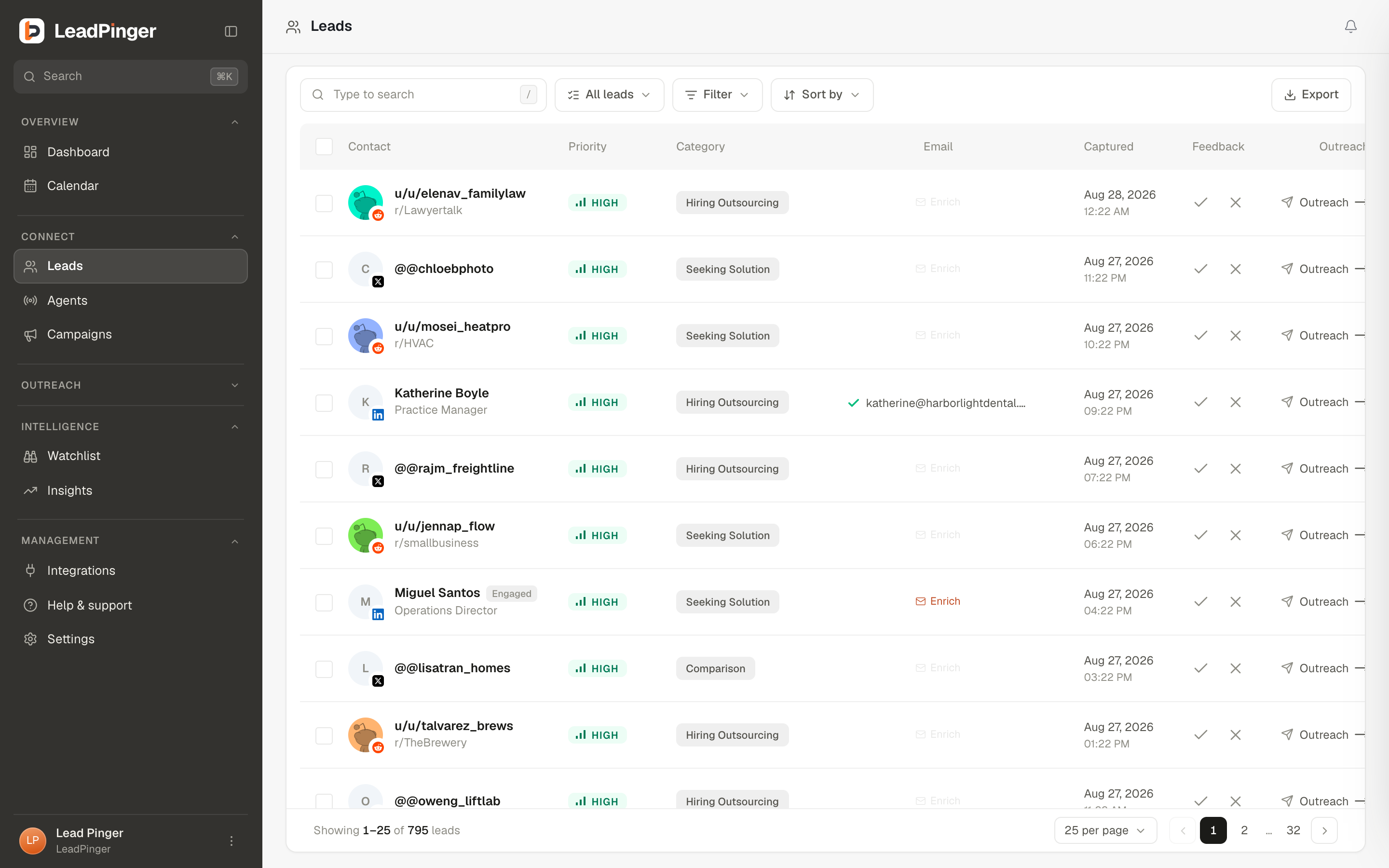
The Leads page is the workbench. Each row is a person: who they are, how strong the signal is, what kind of signal it is, whether you have an email for them, when they were captured, and the actions that matter, all without opening anything. Clicking a row opens the detail panel alongside the table.
Reading a row
| Column | What it shows |
|---|---|
| Contact | Who: u/username and community for Reddit, @handle for X, full name and job title for LinkedIn, with a platform badge on the avatar. |
| Priority | The grade, High, Medium or Low, with a tooltip explaining its basis. See Lead Priorities. |
| Category | The kind of signal: seeking solution, comparison, venting frustration, and so on, or ICP Match for profile leads. |
| A verified address (click to copy), Enrich when one can be looked up, or the state of the search. | |
| Captured | Date and time the lead arrived. |
| Feedback | The two grading buttons: good fit, not a fit. |
| Outreach | One click into the composer with a draft waiting. |
Filters and search
Press / anywhere to search. The Filter drawer stacks scopes: agent, lead status, platform, priority, and (for owners and admins) member. Every lead status is a plain-language stage:
- New: said something worth acting on. Your default working set.
- Prospect: matches your ICP, hasn't said anything yet.
- Watching: relevant, no buying signal yet.
- Outreached: you've reached out.
- Qualified: interest confirmed, worth pursuing.
- Closed: done or archived.
Statuses move automatically where it is safe (reaching out marks a lead Outreached) and by hand everywhere else, from the detail panel's Change status menu. Sort by capture date or priority, in either direction.
Lists
Lists are lightweight groupings that cut across everything else: "Top accounts", "Q3 conference", "Reddit". Create them inline from the list selector, add leads from the detail panel or in bulk, and point an agent at a list to route everything it finds there. All leads always remain visible together under All leads.
Bulk actions
Select rows and a bar rises with the batch moves: add to a list, grade good or bad, export, or delete (armed with a confirm, and it auto-disarms). Grading in bulk is the fast way to calibrate after a keyword change: sweep the obvious misses in one pass.
Questions this page didn't answer? Email support@leadpinger.ai, we usually reply within one business day.