Docs/Working Leads
Acting on a Lead
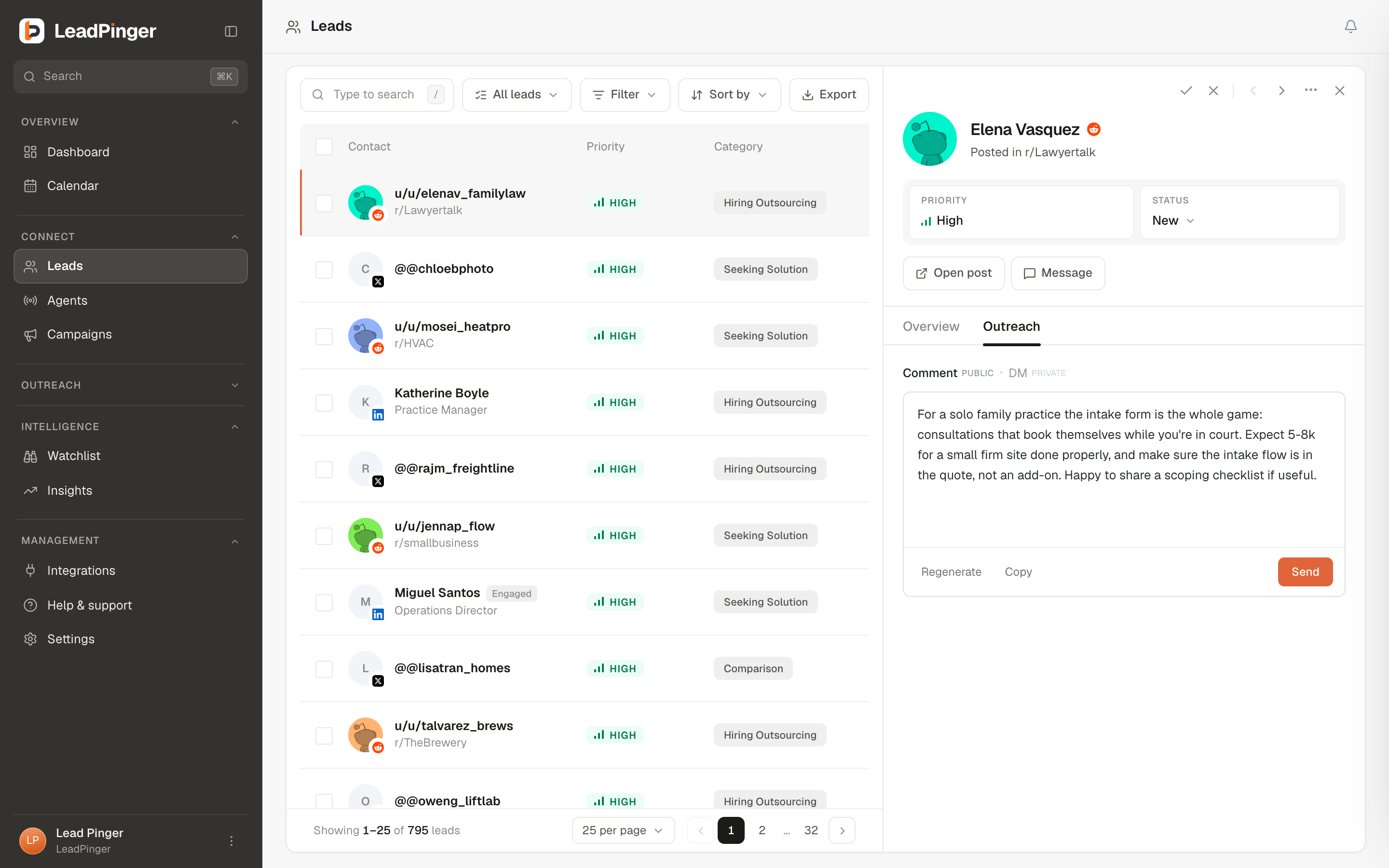
The detail panel is where a row becomes a decision: read the evidence, check the fit, and send the outreach, without losing your place in the queue.
Click any lead and the detail panel slides in beside the table. The queue stays where it was; the left and right arrow keys walk you lead to lead, and Escape closes. Every lead has a shareable link (the ⋯ menu, Copy link), so "look at this one" is a paste in Slack.
The header, at a glance
Priority, status, the grading buttons, and, on team workspaces, a Claimed by {name} tag: one person works a prospect at a time, so your team never doubles up on the same buyer.
The tabs
- Overview: the briefing. "Why {name} is a lead" in plain language, the original post rendered as it appears on its platform with the matched keyword highlighted, and the facts: contact details, role and company for LinkedIn; handle, community, post age and engagement for Reddit and X; and discovery: which agent, which keyword, when.
- Outreach: the composer, with a draft already written for you. Channel tabs (DM, connection note, comment or reply, email) per platform, Regenerate for a fresh take, character counters where platforms enforce them, and Send. Sends go out from your connected account and count toward its weekly allowance, and the conversation continues in Engage.
- Workflow (when enrolled): where this lead sits in an automated sequence: each step, the waits between them, and what happens next. See Outreach Automation.
The ⋯ menu
Add to a list, change status, copy the link, export this lead as CSV, push to a connected CRM, block the user or community (Reddit), or delete. Blocking also removes the current lead and prevents future ones from that source.
The DM-to-invite fallback (LinkedIn)
If you DM a LinkedIn lead you are not connected with, LeadPinger sends the connection request first and delivers your DM automatically the moment they accept. The request counts toward the week's connection requests. The panel and Engage both show the state plainly: "Connection request sent. DMs deliver once they accept."
Questions this page didn't answer? Email support@leadpinger.ai, we usually reply within one business day.